.png)






Your marketing team has a new campaign idea. A fresh landing page, a tweaked pricing layout, and a competitor comparison page that could bring in high-intent traffic this week. So you raise a ticket with engineering.
Three weeks later, it is still sitting in the backlog.
This is the most common growth bottleneck for SaaS marketing teams between $1M and $10M ARR. It is not a strategy problem. It is a tool problem. Your marketing site is stuck behind an engineering queue, and every week it sits there is a week your competitors are testing, publishing, and converting.
Webflow fixes that. This guide covers what Webflow actually does for SaaS marketing teams, why it works better than the alternatives, where it falls short, and how to make the switch without losing your SEO rankings.
What Is Webflow for SaaS Marketing Teams?
Webflow is a visual website builder that lets you design, build, and publish web pages without writing code or filing an engineering ticket.
You drag, drop, and style elements on a canvas. Webflow generates clean code underneath. Your marketing team owns the site, makes changes the same day, and ships campaigns without waiting on anyone.
For SaaS marketing teams specifically, this means full control over your homepage, landing pages, pricing page, blog, and case study library, all without touching engineering bandwidth.
SaaS companies that regularly review and optimise their go-to-market strategy grow significantly faster than those that don't. Speed of execution is the differentiator, not budget.
Webflow vs WordPress vs Custom Build: Which One Is Right for SaaS Marketing?
The honest tradeoff: Webflow gives you speed and autonomy. A custom build gives you full control. WordPress gives you a large content ecosystem. For a B2B SaaS company between $1M and $10M ARR running a lean marketing team, Webflow wins on speed-to-impact.
What Does a Webflow SaaS Marketing Stack Look Like?
A typical Webflow setup for a B2B SaaS marketing team at the $2M to $15M ARR range looks like this:
Webflow hosts the marketing site: homepage, pricing, features, solutions pages, blog, and case studies. HubSpot or Marketo handles forms and lead routing. Clearbit or Mutiny handles personalisation. Google Analytics 4 and Mixpanel handle traffic and event data. Hotjar and Posthog handle on-page behaviour. Segment ties the data layer together.
This stack costs roughly $2,000 to $5,000 per month USD depending on which tools your team is already using and which tier you need.
Webflow's Premium plan (which includes the CMS) costs $25/month billed annually or $39/month on monthly billing, per site. Workspace seats for collaborators are billed separately at $39/month per full seat. Enterprise pricing is custom.
Why SaaS Marketing Teams Choose Webflow
1. You stop waiting on engineering.
Every SaaS marketing team hits this wall eventually. You want to test a new headline. Update the pricing page. Add a comparison page targeting a competitor. But engineering is heads-down on product. The ticket sits for weeks. Webflow removes that dependency entirely. Your team makes the change and publishes it the same day.
2. You can run landing page experiments fast.
Hotjar, the product experience platform, used dedicated landing pages for different audience segments as part of their growth strategy. Webflow makes that kind of experiment possible for a two-person marketing team. You build a new variant, connect it to your analytics stack, and ship it in an afternoon, not a sprint.
3. Your site looks as good as your product.
A generic template signals that marketing is an afterthought. SaaS buyers at the mid-market and enterprise level make quick judgements about a vendor's quality based on the website alone. Webflow gives you the design control to build a site that matches the standard your product deserves.
4. SEO is built in, not bolted on.
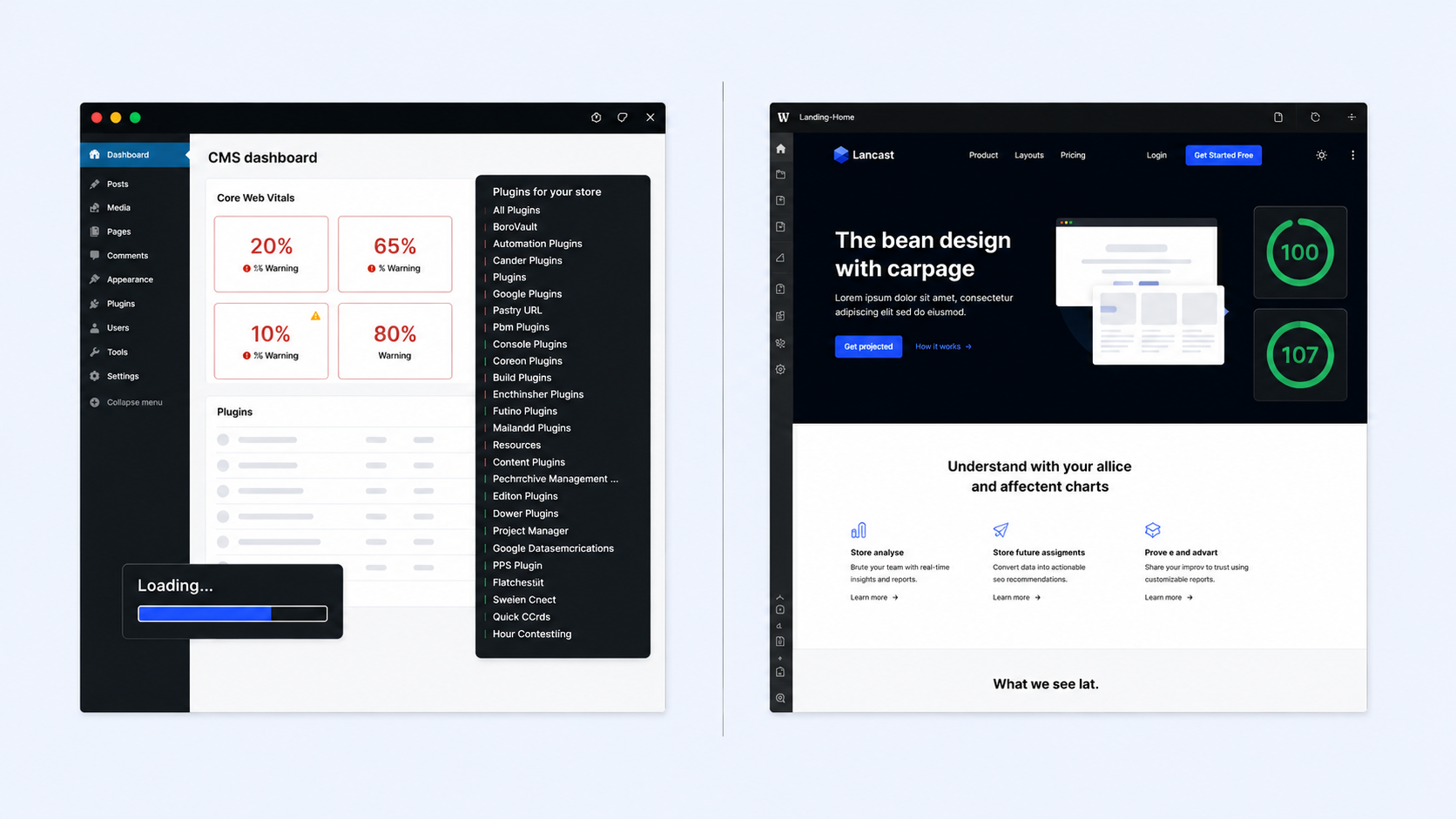
Webflow generates clean code that search engines read well. You control meta titles, descriptions, page structure, and schema markup without needing a plugin. For SaaS companies building content-led inbound programmes, this matters. Plugin-heavy WordPress sites routinely underperform on Core Web Vitals. Webflow sites consistently score well by default.
5. The CMS handles your blog and resource library natively.
You define a content structure once: a blog post, a case study, a changelog entry – and every new piece of content inherits the design. Your team publishes without touching the design view at all.
5 Things SaaS Marketing Teams Actually Use Webflow For
1. Campaign landing pages. Build a dedicated page for every paid campaign, partner launch, or product announcement. No engineering ticket. Publish the same day you brief the copy.
2. Competitor comparison pages. Pages like "Your Product vs Competitor" are high-intent and high-converting. Webflow lets your team build and update these without a developer.
3. Pricing page experiments. Pricing page layout, plan naming, and CTA copy directly affect conversion. Webflow gives you the ability to iterate without a full deployment cycle.
4. Case study and resource library. Define the template once. Every new case study, customer story, or integration page follows the same structure. Writers publish directly into the CMS.
5. Localisation and segmentation pages. Build separate pages for different industries, company sizes, or geographies. Critical for SaaS companies moving upmarket from SMB to mid-market.
Where Webflow Does Not Work for SaaS Marketing
Webflow is not the right tool in every situation.
If your marketing site needs to be deeply connected to your product, such as in-app upsell flows or personalised logged-in dashboards, you will need a custom build or a hybrid approach.
If your content volume is very high, over 500 CMS items with complex filtering and linked content structures, Webflow's CMS can become slow to manage. Tools like Contentful or Sanity paired with a custom frontend handle that scales better.
If your team has no design experience and no one who can operate a visual tool, Webflow will produce a mediocre result. The tool gives you the capability. Your team still has to make the design decisions. Without that judgement, a well-structured WordPress theme is a safer starting point.
How to Migrate a SaaS Marketing Site to Webflow
Step 1: Audit your current site. List every page, its purpose, and its traffic. Prioritise pages that drive pipeline over pages that are purely informational.
Step 2: Define your content structure. Map out which page types need a CMS template, such as blog posts, case studies, changelogs, and integrations, and which are static pages.
Step 3: Build your design system first. Set your typography, colours, spacing, and component library before building any pages. This prevents inconsistency as the site grows.
Step 4: Migrate high-priority pages first. Homepage, pricing page, and your top three organic landing pages. Get these live and validated before migrating the full site.
Step 5: Redirect and protect your SEO. Map every old URL to its new Webflow URL. Set 301 redirects. Resubmit your sitemap to Google Search Console the day you launch.
Step 6: Connect your marketing tools. Add your analytics, forms, chat, and personalisation integrations via Webflow's native embed and integration layer.
A full migration for a 50-page SaaS marketing site typically takes eight to twelve weeks with an experienced Webflow agency. Done internally by a team without prior Webflow experience; budget: 16 to 20 weeks.
.jpg)
The Minute Creative Approach
Most SaaS marketing teams do not have a Webflow problem. They have a speed and ownership problem. Engineering owns the site. Marketing waits. Campaigns get delayed. Experiments never ship. Growth slows down, and nobody can point to exactly why.
Minute Creative works with B2B SaaS companies at Seed and Series A to fix this at the root. We design SaaS marketing sites that your team can own and operate from day one: no developer needed for routine updates and no agency retainer required to change a headline. You get a site that is fast, cleanly built, connected to your full marketing stack, and designed to convert the buyers you are actually going after. Most teams are fully independent within the first week after handover.